

If you’re planning to buy a new graphics card, one of the biggest questions you’ll face is how much VRAM do you need for gaming? After spending time testing modern games and comparing GPUs with different memory capacities, I’ve seen how VRAM can affect performance, texture quality, and long-term usability.
It’s no longer just about choosing the fastest GPU—your resolution, graphics settings, and the games you play matter just as much. With Unreal Engine 5 features like Nanite and Lumen, plus DLSS 4 and FSR 4 frame generation, VRAM demands have grown rapidly. This guide will help you choose the right VRAM capacity for your gaming needs and budget in 2026.
Quick picks:
| Resolution | Minimum VRAM | Recommended VRAM | Future-Proof VRAM |
|---|---|---|---|
| 1080p | 8GB | 8GB–12GB | 12GB |
| 1440p | 8GB | 12GB | 16GB |
| 4K | 12GB | 16GB | 16GB–24GB |
What Does VRAM Actually Do?
VRAM (Video RAM) is the dedicated memory on your graphics card that stores textures, geometry, shaders, frame buffers, and other graphical data so the GPU can access it instantly while rendering games.

Why VRAM Matters:
- Stores game assets such as textures, shadows, geometry, and frame buffers for fast GPU access.
- Prevents stuttering by keeping data on the graphics card instead of transferring it from slower system RAM over PCIe.
- Supports higher resolutions like 1440p and 4K, which require significantly more video memory.
- Allows higher texture settings without texture pop-in or quality reductions.
- Handles modern game engines such as Unreal Engine 5, where technologies like Nanite and Lumen continuously stream large amounts of graphical data.
- Provides headroom for frame generation technologies like DLSS 4 and FSR 4, which typically use an additional 1–2GB of VRAM.
- Improves longevity, making a GPU more capable of handling future games with increasing memory requirements.
Key takeaway: DLSS and FSR can reduce GPU workload by lowering the internal render resolution, but they do not significantly reduce VRAM usage because high-resolution textures and other assets still need to remain in memory.
Is More VRAM Better for Gaming?
Not always. More VRAM helps only when a game actually needs it. If your games use less than the available VRAM, adding more won’t increase FPS.
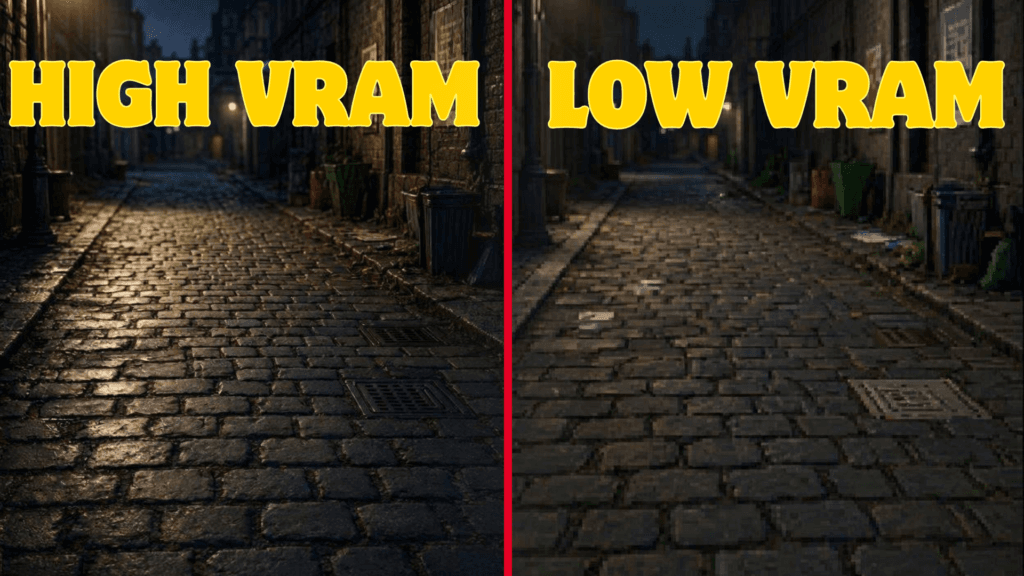
However, when VRAM runs out, games may suffer from stuttering, texture pop-in, longer loading times, or lower texture quality.
The goal is to have enough VRAM for your resolution and graphics settings, not simply the highest number available.
VRAM by Capacity: 8GB vs 12GB vs 16GB
Here’s where the real buying decision happens. Each tier has a clear place in 2026 — the question is which one matches how and where you actually play.
Is 8GB VRAM Enough for Gaming in 2026?
Yes, for 1080p and esports titles. 8GB remains a viable floor for 1080p gaming and handles competitive titles like Counter-Strike 2 and Valorant with room to spare, but it’s no longer a comfortable buffer — 1440p or ultra-texture AAA settings can push it into stuttering and texture pop-in.
Best for:
- 1080p gaming on a tight budget
- Esports and competitive titles at high refresh rates
- Older or lighter game libraries
Limitations:
- AAA open-world titles at 1080p Ultra with ray tracing can approach the 8GB ceiling
- Frame generation’s memory overhead can tip an 8GB card over the edge in demanding scenes
- Not a safe pick if you plan to move to 1440p later
| PROS | CONS |
|---|---|
| Lowest cost tier plenty for 1080p and esports | Little headroom for AAA ultra settings |
| Efficient power draw | Risk of stutter and texture pop-in at 1440p |
| – | Short upgrade runway |
Is 12GB VRAM Enough for Gaming in 2026?
Yes — 12GB is the practical floor for 1440p gaming in 2026. It handles most current AAA titles at high settings without ray tracing, and stays within limits in many demanding titles with modest settings adjustments.
Best for:
- 1440p gaming without chasing every ultra setting
- 1080p gamers who want headroom for several years
- Mixed libraries of AAA and live-service titles
Exceptions:
- Some texture-heavy 2026 releases can approach or exceed 12GB at 1440p with ray tracing and maxed textures
- If you want full settings with no compromises at 1440p, 16GB is the safer long-term pick
| PROS | CONS |
|---|---|
| Comfortable floor for 1440p | Can still get pressured by the most demanding 2026 releases at maxed settings |
| Handles most current AAA titles at high settings | Not a confident 4K pick |
| Good price-to-headroom balance | – |
Is 16GB VRAM Overkill for Gaming in 2026?
No—16GB is the comfort tier for 1440p and the recommended minimum for 4K, not overkill. Real-world testing shows 8GB cards still running most games acceptably on average, but 16GB pulling notably ahead in worst-case, texture-heavy moments where the 8GB card has to compromise.
Best for:
- 1440p gaming with everything maxed, including ray tracing
- 4K gaming at high-to-ultra settings
- Players who keep a GPU for three or more years, or who mod heavily
Caveats:
- For 1080p-only or esports-only play, 16GB delivers little practical benefit over 12GB — that budget may be better spent on a faster GPU core
- Going beyond 16GB (24GB+) is mainly a content-creation or professional-rendering consideration, not a gaming requirement for most players
| PROS | CONS |
|---|---|
| Comfortable for 1440p ultra and 4K | Costs more than most 1080p or esports players need |
| Strong multi-year runway | Diminishing returns past 16GB for pure gaming |
| Handles frame-gen overhead with room to spare | – |
Best VRAM for 1080p, 1440p, and 4K Gaming
Resolution is the single biggest factor in how much VRAM you actually need, since a larger frame buffer and higher-resolution textures both scale directly with pixel count.
| Resolution | What Most Games Need | When to Go Higher |
|---|---|---|
| 1080p | 8GB covers the vast majority of titles, including esports and most AAA games at high settings | Choose 12GB if you play texture-heavy AAA open-world games at Ultra with ray tracing |
| 1440p | 12GB is the practical floor for high settings without ray tracing | Choose 16GB if you want ray tracing, maxed textures, or plan to keep the card 3+ years |
| 4K | 16GB is the recommended minimum for high-to-ultra settings | Choose 20GB+ if you want ultra texture packs, heavy ray tracing, and long-term headroom |
At 4K specifically, larger frame buffers and higher-resolution texture sets push VRAM needs up sharply compared to 1080p or 1440p at the same settings — this is the resolution where skimping on VRAM shows up fastest.
How Can I Check VRAM on My GPU?
On Windows, open Task Manager → Performance → GPU to see your graphics card’s dedicated VRAM. You can also check GPU-Z, AMD Software, NVIDIA App, or the manufacturer’s specifications page for your GPU model.
Current GPUs by VRAM Tier (2026)
Knowing the tiers is only half the picture — here’s how it maps to what’s actually on shelves right now from Nvidia and AMD.
| GPU | VRAM | Memory Type | Best Fit |
|---|---|---|---|
| RTX 5060 | 8GB | GDDR7 | 1080p |
| RX 9060 XT | 8GB or 16GB | GDDR6 | 1080p (8GB) / 1440p (16GB) |
| RTX 5060 Ti | 8GB or 16GB | GDDR7 | 1080p (8GB) / 1440p (16GB) |
| RTX 5070 | 12GB | GDDR7 | 1440p |
| RTX 5070 Ti | 16GB | GDDR7 | 1440p / entry 4K |
| RX 9070 | 16GB | GDDR6 | 1440p |
| RX 9070 XT | 16GB | GDDR6 | 1440p / entry 4K |
| RTX 5080 | 16GB | GDDR7 | 4K |
| RTX 5090 | 32GB | GDDR7 | 4K / content creation |
Worth Noting: Both the RTX 5060 Ti and RX 9060 XT ship in two different VRAM configurations under the same model name, so double-check the specific SKU before buying—the 8GB and 16GB versions of the same card can behave very differently at 1440p.
If you’re comparing against an older card already in your PC, our RTX 3080 vs 3080 Ti breakdown covers where those sit relative to today’s 12GB tier.
Common VRAM Buying Mistakes to Avoid
A few habits account for most of the “why is my new GPU stuttering” complaints. They are worth checking before you blame the card.
- Maxing out texture settings on an 8GB card at 1440p: Ultra textures alone can push an 8GB card past its limit even when the frame rate looks fine on paper.
- Counting shared VRAM as real VRAM: The “shared GPU memory” figure Windows shows pulls from system RAM as a fallback — it isn’t dedicated VRAM and can’t replace it.
- Assuming DLSS or FSR frees up VRAM: Upscaling lowers render resolution, not texture memory demand — and frame generation actually adds VRAM overhead on top.
- Buying by model name alone: As the table above shows, some GPU names cover two different VRAM configurations — always confirm the exact spec sheet.
- Ignoring system RAM while focused on VRAM: VRAM and system RAM are different pools solving different problems; if you’re also due for a memory upgrade, see our guides on DDR4 vs DDR5 and how to upgrade RAM for gaming.
Should You Keep, Upgrade, or Replace?
- 8GB → 12GB: Worth considering if you’re moving from 1080p to 1440p or starting to see texture pop-in and stuttering in demanding AAA games.
- 12GB → 16GB: A worthwhile upgrade for 1440p max settings, ray tracing, heavy texture packs, or if you plan to keep your GPU for three or more years.
- 16GB → 20GB/24GB+: Usually unnecessary for gaming alone. Consider it mainly for 4K with demanding texture settings, heavy modding, or workloads such as content creation.
- Don’t upgrade just for the VRAM number: If your current GPU has enough VRAM for your resolution and settings, a higher-capacity card won’t automatically deliver more FPS. GPU core performance still matters more for raw frame rates.
My Honest Answer on VRAM
After looking at VRAM by resolution, game type, and the way modern titles use memory, I wouldn’t buy a GPU based on VRAM capacity alone. The amount you need depends heavily on where you play and how long you plan to keep the card.
- 1080p: I’d choose 8GB for esports and lighter games, but 12GB gives you more room for demanding AAA titles.
- 1440p: 12GB is the practical minimum, while 16GB is what I’d choose for maxed settings, ray tracing, and longer-term use.
- 4K: I’d go with 16GB or more, especially if you want high-to-ultra textures and ray tracing.
- For a 3+ year GPU: I’d lean toward the higher VRAM option when the price difference is reasonable, rather than buying a card that is already close to its memory limit.
- For esports: Don’t pay a large premium for extra VRAM. If 8GB is enough for the games you play, a faster GPU core can provide more useful performance.
My biggest takeaway is simple: buy enough VRAM for your resolution and settings, but don’t sacrifice GPU performance just to get a bigger memory number. For most new gaming PCs in 2026, I’d target 12GB for 1440p and 16GB for 4K.
People Also Ask About VRAM and Gaming
Not directly. VRAM capacity prevents stutter and texture pop-in when a game exceeds it, but frame rate itself comes mainly from the GPU’s core performance, not memory size.
No, VRAM is soldered directly to the graphics card and can’t be added or swapped afterward—the only way to get more is a new GPU.
Only slightly. They lower the internal render resolution to boost FPS, but texture memory demand stays roughly the same, and frame generation actually adds VRAM overhead.
Rarely. Titles like Counter-Strike 2 and Valorant use only a few gigabytes even at max settings, so 8GB is plenty for competitive-focused play.
Both matter, but for different reasons. Core performance drives raw frame rate, while VRAM capacity determines whether that frame rate stays smooth and stutter-free at your settings.
