

Want a certain Xbox game but purchased the wrong one mistakenly? That’s completely ok if you are a gaming geek. The best part is you can get the refund.
I can’t even count how many times I’ve made this mistake, and somehow, I still keep repeating it. And the most recent incident was refunding Jujutsu Kaisen: Cursed Clash.
The refunding procedure is quite straightforward and easy if you meet certain requirements. In this guide, I am going to tell you the exact steps you need to follow to refund a game on Xbox.
Quick Takeaways
- Xbox game refunds depend on Microsoft’s eligibility requirements.
- The refund request can be submitted through a Microsoft account or Xbox console.
- The process includes finding the purchase, selecting a refund reason, and submitting the request.
- Refund requests after 14 days may still be considered in some cases.
- A denied refund can be taken to Xbox Support for further review.
What Is an Xbox Game Refund?
An Xbox game refund is a request to get your money back after buying a digital game from the Xbox or Microsoft Store. If you no longer want the game or there is a problem with the purchase, you can submit a refund request to Microsoft.
Microsoft reviews each refund request based on its refund rules. Different types of factors can affect Microsoft’s refund decision. These factors include things like the purchase date, how much you have played the game, and the reason for requesting the refund.
If the purchase meets Microsoft’s requirements, Microsoft may approve the refund and return the money to your original payment method or another eligible form of payment.
From my experience, checking these details before submitting the request makes the process much clearer. It also helps avoid sending a request without knowing whether the purchase meets the basic requirements.
What Is the Eligibility Criteria for Xbox Game Refund?
Not every Xbox game purchase qualifies for a refund. Microsoft checks a few basic details before approving a refund request.
Your purchase is more likely to qualify if:
- The game was purchased within the last 14 days.
- You have played the game for a limited amount of time.
- You have not used the DLC or spent the in-game currency.
- The purchase falls under Microsoft’s refund rules.
Microsoft may also review some refund requests made after 14 days. The reason for the refund and the details of the purchase can affect the decision.
How to Refund a Game on Xbox (step-by-step)
If you want to request a refund, you can do it through your Microsoft account on your gaming PC or directly from your Xbox console. Here are the details of the steps you have to follow:
Refunding through your Microsoft account
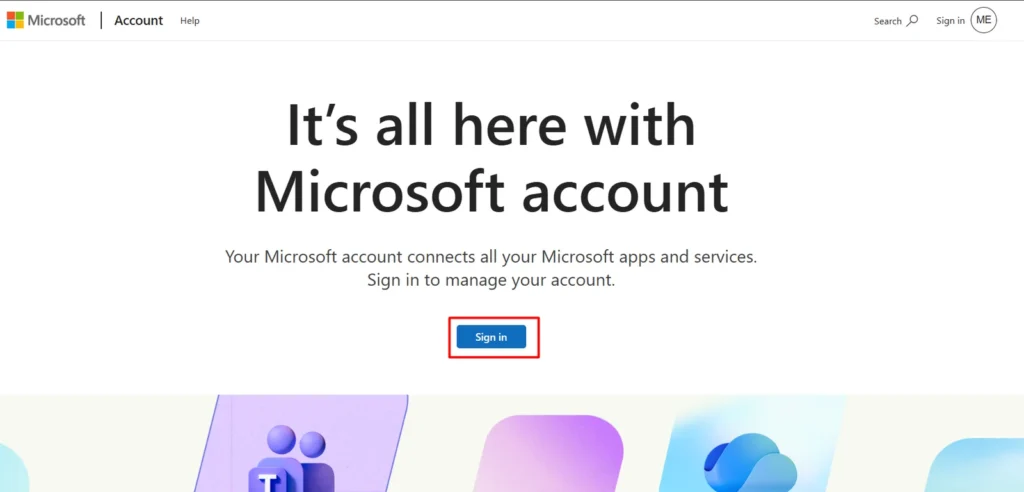
- Go to the Microsoft account page and sign in with your account.
- Open your order history and find the game.
- Select the item, then choose “request a refund.”
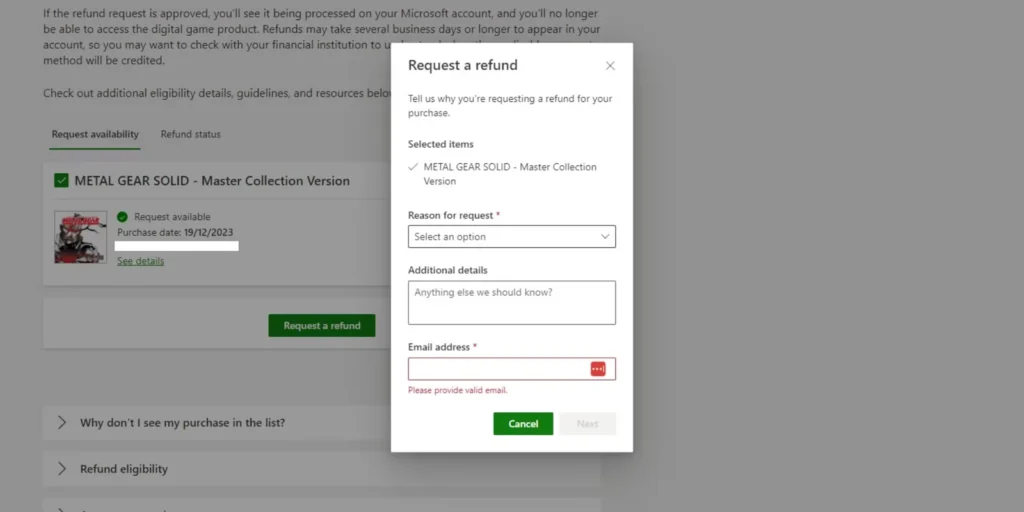
- Pick a reason from the dropdown menu.
- Review the details and submit the form.
Refunding Directly From Your Xbox Console
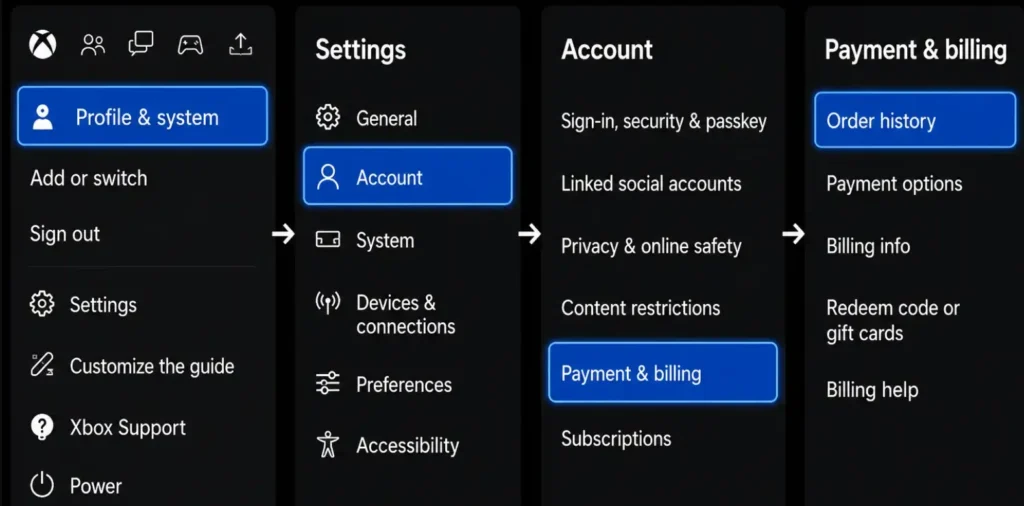
- Press the Xbox button and open Settings.
- Go to Account, then Payment and billing.
- Select Order history.
- Find the purchase from the game list.
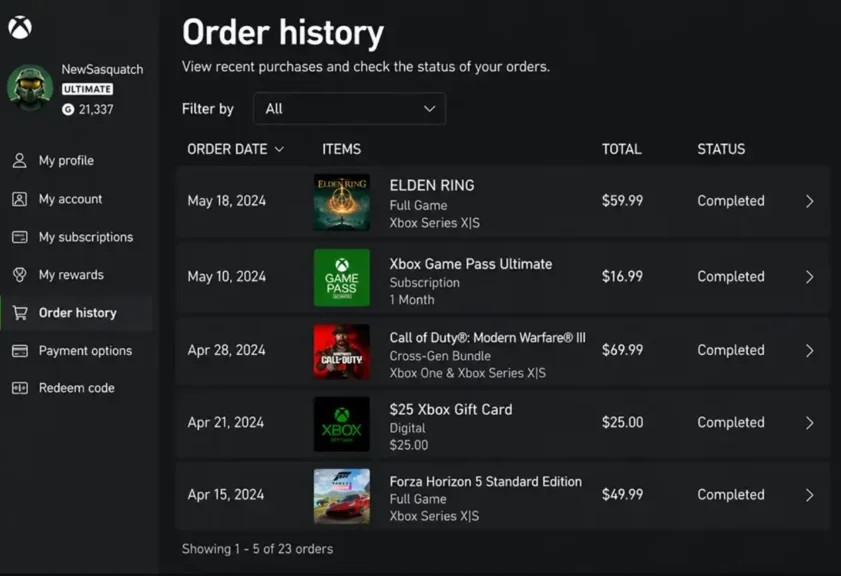
- Choose “request a refund” and follow the on-screen prompts.
How to Refund a Pre-ordered Game?
I once tried to cancel an Xbox game I had pre-ordered, and the first thing I checked was whether Microsoft had already charged me. That detail changes the process.
If you have not been charged yet, you can cancel the pre-order from your Microsoft account’s order history. You can usually cancel it up to 10 days before the game’s release date without submitting a refund request.
If Microsoft has already charged you, you need to submit a regular refund request. You can use your Microsoft account or Xbox console to send the request.
How to Check Your Xbox Refund Status?
Once you submit a request, you do not need to guess what happens next. Sign back into your Microsoft account, open Order history, and look for a “refund status” label next to the item.
Most requests move from “pending” to “processed” within a few business days, and the amount lands back on your original payment method shortly after.
If the refund shows as processed but the money has not appeared in your bank or card statement after several days, check with your financial institution before contacting Xbox again.
Can You Refund an Xbox Game After 14 Days?
If more than 14 days have passed since you bought an Xbox game, you can still submit a refund request. However, Microsoft may not approve the request because it falls outside the usual refund period. This can be especially confusing for beginner gamers who are still learning how Xbox refunds work.
A late refund request has a better chance when there is a clear problem with the purchase. Microsoft may consider some cases for up to 90 days after the purchase.
You may have a better chance if:
- The game has a technical problem that stops you from playing.
- You did not make the purchase yourself.
- You were charged the wrong amount.
- You did not notice the charge when it happened.
How to Request a Refund After 14 Days?
You can still send a refund request after the 14-day period has ended. Microsoft will review the request, so explain why you are asking for a refund late.
Here is what to do:
- Open your Microsoft account or Xbox order history.
- Select a reason and explain what happened.
- Explain why you missed the 14-day window.
- Submit the request and wait for Microsoft’s response.
- If denied, contact Xbox Support for a manual review.
What to Do if Your Xbox Refund Is Denied?
If Microsoft denies your refund request, you can still ask Xbox Support to look into the case. This is worth doing if you believe the decision does not match your situation.
Contact Xbox Support through live chat and explain why you requested the refund. Keep your order number and purchase details nearby so you can provide them during the conversation.
Ask the support agent if they can review the request manually. Explain the situation clearly and include any details that were not clear in your original refund request.
Why Did Your Xbox Refund Get Denied?
Microsoft can deny a refund request for several reasons. The decision may depend on the purchase, how you used the game, and when you submitted the request.
Some common reasons include:
- The game has too much playtime.
- You requested the refund after the allowed period.
- You have made several refund requests before.
- The purchase does not meet Microsoft’s refund rules.
- You have already used the DLC or spent the in-game currency.
How to Refund Games Bought by a Child or Family Member?
A child or family member can sometimes buy a game by mistake when a payment method is saved on the Xbox. You can request a refund for the purchase through the usual refund process.
- Check Family Settings to review the child’s purchase history before filing anything.
- Use the “accidental purchase” reason when submitting the request.
- Consider requiring a PIN for future purchases to prevent repeat charges.
- If your child enjoys gaming across different devices, you can also look into free iPad games as an alternative to paid games.
Microsoft generally treats these cases the same as any other accidental buy, so the approval odds are similar to a standard request.
Tips to Get Your Xbox Refund Approved Faster
A few small habits noticeably improve approval odds, based on patterns reported across Xbox forums and support threads.
- Submit the request within a few days of purchase rather than waiting until close to the 14-day mark.
- Keep playtime under one hour if possible before requesting.
- Avoid submitting duplicate requests for the same item, since this can flag the account.
- Write a short, specific reason instead of a generic one-line explanation.
- Space out refund requests over time rather than filing several in the same week.
My Final Answer
Refunding a game on Xbox is fairly straightforward once you know the eligibility rules and where to submit the request. I found that checking the purchase date and playtime first helped me understand whether my game was likely eligible.
You can submit the request through your Microsoft account or Xbox console, then track its status afterward. If a request gets denied, contacting Xbox Support for a manual review can help resolve genuine cases.
People Also Ask About Refunding Games on XBOX
It is unlikely, since Xbox factors in playtime when reviewing requests. Games with minimal playtime have noticeably better approval odds.
Most refunds process within three to five business days. The money may take a few extra days to appear depending on your bank.
Yes, gift card purchases follow the same refund rules as other payment methods. The refunded amount typically returns as store credit rather than cash.
Xbox does not publish an exact number, but frequent requests can reduce future approval odds. Occasional, well-explained requests are treated normally.
Yes, but the request usually needs to come from the account that made the purchase. The recipient cannot typically initiate the refund themselves.
